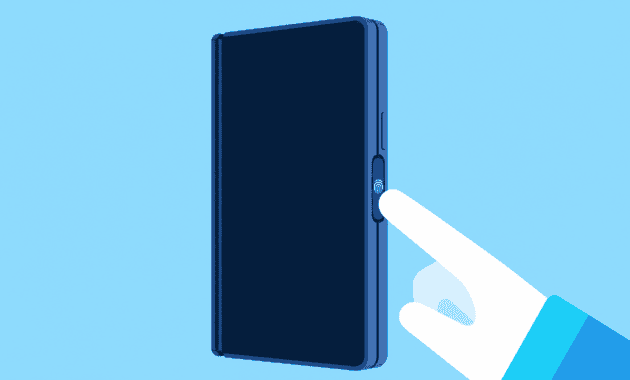
The Samsung Galaxy Z Fold 8 fingerprint sensor abandons the in-screen ultrasonic readers that have frustrated users for years. Early hands-on reports and Samsung’s own spec sheets confirm the phone uses a side-mounted capacitive sensor built into the power button. The move quietly fixes the most persistent complaint about modern phone security: ultrasonic scanners that choke on screen protectors, dry fingers, and slightly misaligned thumbs.
Why Ultrasonic Fingerprint Sensors Fail
Ultrasonic sensors map the ridges and valleys of a finger by bouncing sound waves through the display glass. Qualcomm pushed the technology as the premium alternative to optical scanners, but real-world use exposed a long list of weaknesses. A 2022 study cited by Android Central found that approximately 24 percent of people have fingerprints that are difficult for these sensors to match, leaving a sizable minority with constant lockout frustration.
The problem compounds when users add tempered glass screen protectors. Traditional protectors create an air gap that distorts the ultrasonic signal. Manufacturers responded with specific adhesives and liquid application processes, but even then consistency varies from one protector to the next. A protector that works out of the box may start failing after weeks of use as the adhesive settles. Optical in-screen sensors suffer less from protectors, but they lag in low light and wake the display to blast light, annoying anyone who unlocks the phone at night.
Samsung itself used ultrasonic sensors on the Galaxy S23 and S24 series and earlier Z Fold models. Forum threads and Reddit posts routinely catalog users registering the same finger three or four times to improve recognition. The sensors also struggled with wet or overly dry digits — a limitation ultrasonic tech has never fully escaped. Each year, Samsung refined the algorithms, but the hardware itself remained a point of friction for everyday unlocking.
Galaxy Z Fold 8 Fingerprint Sensor: Why the Side Button
The Galaxy Z Fold 8 Ultra sidesteps the entire debate by putting the fingerprint reader where foldables have often kept it: on the side power button. Engadget highlighted the side-mounted sensor in its hands-on coverage, confirming the design carries over the capacitive approach used in previous Z Fold generations. That continuity means the sensor has already proven itself through years of real-world use on millions of devices.
Capacitive sensors work by measuring tiny electrical charges on the skin, a method that has remained reliable since it first appeared on laptops and older phones. The physical nature of the scan means it does not need light and does not get confused by screen protectors because the finger connects directly with the sensor surface. A decent case can still leave the button recessed but accessible, and thin cases or Samsung’s own first-party options keep the sensor fully exposed.
The sensor sits in a position the index finger or thumb finds naturally whether the phone is closed or unfolded. When the phone is shut, the right thumb rests on the button. When it is open in tablet mode, the right index finger wraps around to the same spot. That consistency removes the occasional awkwardness of in-screen scanners, which require a specific landing zone that shifts depending on whether the person is holding the phone one-handed or two-handed.
Capacitive Sensors Outperform Ultrasonic Readers
Speed is the most immediate advantage. A capacitive sensor registers a finger in milliseconds because it uses a simple ridge map rather than a multilayered sound wave reconstruction. Unlocking feels instantaneous, with no lag waiting for the screen to wake and the scanner to process. Ultrasonic sensors have improved over generations, but they still add a perceptible beat between touch and unlock that a side capacitive button simply does not have.
Durability tells another part of the story. A physical sensor on a metal button has fewer points of failure than a transducer embedded under layers of display. If the button ever fails, it is a mechanical component that can be replaced without destroying the phone’s screen. Ultrasonic sensors embedded behind OLED panels require a full display replacement when they malfunction, a repair cost that often runs several hundred dollars.
Accuracy across different finger conditions also tilts in favor of capacitive. Damp thumbs often confuse ultrasonic scanners because water fills the ridges. Calloused or very dry fingertips present a similar challenge. The capacitive Galaxy Z Fold 8 fingerprint sensor registers the conductive properties of the skin, which hold up far better under those variations. Samsung’s early briefings did not publish specific false rejection rates, but the technology’s track record in banking and access-control hardware speaks for itself.
Foldables Show the Way for Fingerprint Tech
Foldable phones never fully abandoned side sensors the way slab phones did. Samsung, Motorola, and Oppo all kept capacitive readers on the power button for their book-style foldables, partly because an in-screen sensor would need to sit on both the cover display and the inner panel to avoid breaking the unlock experience. The Galaxy Z Fold 8 fingerprint sensor reaffirms that design choice, proving that a proven technology can beat a newer one that still has rough edges.
Other manufacturers may take note. Ultrasonic sensors are expensive and add millimetres of thickness because of the transducer layer inside the display stack. As phones push toward thinner designs, every fraction of a millimetre matters. A side button reader takes up almost no internal space and costs less to produce. The Z Fold 8 Ultra measures just 4.1mm when open, according to Engadget, and the side sensor played a part in hitting that number.
Samsung has not announced any move to bring side capacitive sensors back to its S-series slab phones, but the success of the Z Fold 8 line makes the omission harder to justify. What was once seen as a budget shortcut now looks like the smarter engineering choice.
Z Fold 8 Fingerprint Sensor FAQ
Does the Galaxy Z Fold 8 Ultra use an in-screen fingerprint scanner?
No. The Z Fold 8 Ultra uses a capacitive fingerprint sensor embedded in the side power button, not an ultrasonic in-screen reader. This design carries over from previous Z Fold models and works identically across the cover display and unfolded screen.
Can I put a screen protector on the Z Fold 8 without ruining the fingerprint sensor?
Absolutely. Since the Galaxy Z Fold 8 fingerprint sensor sits on the physical button rather than under the display, any screen protector applied to the outside or inside screen has zero impact on unlocking performance. Tempered glass, film protectors, and factory-installed protectors all leave the sensor untouched.
Why did Samsung choose a side fingerprint sensor for the Z Fold 8?
Samsung kept the side sensor for reliability, speed, and design simplicity. An in-screen ultrasonic reader would need to work through two separate displays on a foldable, adding cost and complexity. The side button reader is faster, more tolerant of damp or dry fingers, and reduces internal space requirements, all crucial for a phone that folds to 8.9mm thickness.