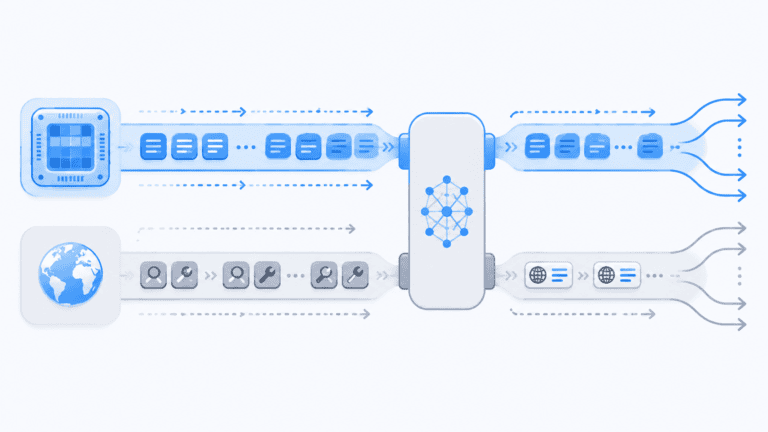

The Colibri inference engine lets a 744 billion parameter model called GLM-5.2 run on a laptop with just 25 GB of RAM. No graphics card needed. The model itself takes up about 370 GB on disk once it’s shrunk down to 4-bit precision. Colibri never tries to load all of that into memory. Instead it pulls the active expert layers off an NVMe drive as it needs them, keeps the popular ones cached, and holds a small dense core in memory at all times. The upshot is a working local AI assistant on hardware that, until now, couldn’t even fit the model on disk let alone run it.
What Is the Colibri Inference Engine?
The Colibri inference engine is an open-source project written in plain C, with no runtime dependencies to install. It’s built for GLM-5.2, a mixture-of-experts model from Z.AI with 744 billion parameters. Normally, a model this size needs several high-end GPUs and hundreds of gigabytes of VRAM. Colibri does something else entirely. It splits the model into a dense core, which handles attention and shared layers, and 19,456 routed specialists, or experts. Only the dense core and whichever experts are active at that moment ever touch RAM or CPU cache. Everything else waits on a fast NVMe disk until it’s called on.
One developer built this alone, and it has already pulled in over 17,000 stars on GitHub. It pushes back on the idea that local AI needs memory equal to model size. Think of it less like a brute-force loader and more like a librarian, pulling expert weights off the shelf the moment they’re needed. The project page on GitHub lays out the pure C implementation, which builds and runs on Linux, Windows, or macOS.
The first thing most people notice is a web dashboard called the Brain page. It shows all 19,456 experts as a kind of living cortex, lighting up whichever ones fire for a given prompt. Colibri doesn’t treat the model as one giant file. It treats it as a set of swappable modules that the router can call up on demand.
How Expert Streaming Works
The Colibri inference engine runs on a storage hierarchy. The dense core, roughly 9.9 GB of weights, sits in RAM permanently. The other 21,504 routed experts live on an NVMe SSD. Every time the model generates a new token, the router picks a handful of experts, and Colibri streams just those weights off disk. A breakdown by Mayank A. on LinkedIn puts it plainly: for every token, about 40 billion parameters are active out of the 744 billion total. Of that, about 11 GB of experts change from token to token, while the shared attention layers stay put.
Each token goes through five steps. Route picks which experts fire. Union gathers up the weights needed. Place decides whether an expert comes from RAM or disk. Overlap runs disk reads and computation at the same time so I/O doesn’t stall everything. Learn adjusts the caching strategy based on what’s actually being used.
Since most experts sit unused in any given conversation, the system sidesteps the usual memory wall. The router’s choice and the precision of the weights stay the same whether the answer comes from RAM or gets streamed from NVMe. The whole point is that where a weight lives should only affect speed, never correctness.
The Hot Warm and Cold Cache Hierarchy
The Colibri inference engine’s cache figures out which experts you actually use. After a handful of prompts, the runtime tracks how often each expert gets activated and pins the busiest ones into spare RAM. The LinkedIn post breaks it into three tiers: hot experts in VRAM or fast RAM, warm experts in regular RAM, and cold experts sitting on the SSD. Ask a run of physics questions, and the physics experts go hot and stay in memory. Switch to legal questions, and the law experts climb up while the physics experts cool back down.
It works a lot like a CPU cache, just applied to neural network layers instead of instructions. The longer you use it, the faster it gets at your recurring tasks, since it stops needing to pull those experts off disk. The GitHub repo shows this off with a live dashboard: each expert is a tile that brightens when it’s routed to. You can watch the system learn in real time.
Unlike a fixed cache, Colibri keeps adjusting as you use it. Peak RAM use during a chat session runs around 20 GB, leaving some room within a 25 GB system. Rarely used experts, say for ancient Sanskrit translation or obscure medical diagnoses, stay parked on the NVMe drive and only get promoted for as long as they’re actually queried.
Performance You Can Expect
The first time you run the Colibri inference engine, don’t expect much speed. The LinkedIn post notes that cold access, where every expert has to be read off disk, gets you roughly 0.05 to 0.1 tokens per second. That’s not something you’d want to chat with day to day. But once the cache warms up, prompts in familiar territory get noticeably quicker, since the experts they need are already sitting in RAM. Hardware still sets a hard limit here: each token can call for up to 11 GB of disk reads, and that’s the real bottleneck on a consumer NVMe drive.
This project is a proof of concept, not a stand-in for a GPU cluster. What it shows is that for sparse mixture-of-experts models, the amount of RAM you have and the size of the model no longer have to match. A 25 GB machine can run a 370 GB model because only a slice of the weights are active at once. There’s no full benchmark yet on how much the 4-bit quantization costs in output quality, though early reports say it matches the reference implementation token for token on sample sequences.
Speculative decoding and an int8 draft head are built in to help throughput along, but the real story is the streaming architecture itself. A speed ladder shared in the community shows machines with faster SSDs and more RAM to spare hitting proportionally higher tokens per second. The bigger point stands either way: this model runs at all on hardware that couldn’t even load it before.
How to Get Started with Colibri
Getting the Colibri inference engine running starts with cloning the repository from GitHub. One build command compiles the pure C code. The project ships a `coli doctor` utility that checks your system and suggests settings. Once it’s built, you download GLM-5.2 converted into Colibri’s int4 format. There’s a pre-converted version on Hugging Face (mateogrgic/GLM-5.2-colibri-int4-with-int8-mtp) if you’d rather skip the conversion. The model file runs about 370 GB, so you’ll want a fast NVMe drive.
It runs on Linux, Windows, and macOS, though you’ll get the best results with at least 25 GB of RAM and a PCIe Gen4 NVMe SSD. No GPU is required, but if you have one, Colibri can use it for the dense core while expert streaming keeps running off disk. A web dashboard launches at localhost so you can watch expert activity, check on cache behavior, and adjust settings. You can tune cache size, prefetch depth, and the speculative decode window.
Because the system learns your habits, that slow cold start warms up the more you use it. The open-source community has already put together documentation and unofficial guides for first-time setup, covering everything from resizing the disk cache to testing different prompt domains just to watch the routing shift.
Frequently Asked Questions
How does the Colibri inference engine speed up with repeated use?
The Colibri inference engine tracks which experts your prompts call on most and pins them into spare RAM. After a few interactions, those hot experts stay put and skip the disk read entirely. So your regular topics get faster without you tuning anything. A legal researcher asking contract law questions will see quick responses on that ground, while a one-off question about astrophysics might still trigger a cold read from NVMe.
What kind of SSD is required to run the Colibri inference engine effectively?
You’ll want a fast NVMe drive, ideally PCIe Gen4 or newer, to get the most out of the Colibri inference engine. In the worst case, the engine reads up to 11 GB of expert weights per token, so a slower SATA SSD would choke performance. The project’s documentation recommends an NVMe drive with sustained read speeds above 3,000 MB/s to keep token generation at a reasonable pace.
Can the Colibri inference engine run other mixture-of-experts models?
Right now the Colibri inference engine is built for GLM-5.2, but the architecture itself isn’t tied to one model. Any mixture-of-experts model with a similar routing pattern could, in theory, be adapted to it. People in the community are already poking at other MoE architectures, and the developer has said support for more model families is on the roadmap.